Best Time & Capacity Tools for Freelancers: Managing Workload and Utilization
Introduction
Many freelancers search for time tracking and capacity planning tools to organize their workload and improve productivity.
They expect software to solve problems such as:
- overloaded schedules
- unpredictable workloads
- missed deadlines
- inefficient time allocation
In practice, tools alone do not solve capacity problems.
Capacity planning for freelancers determines how much work can be delivered safely within available time.
Without structured capacity planning, software simply records activity rather than controlling workload.
Within the Processome operating model, capacity planning belongs to the Capacity Planning System — the execution framework responsible for aligning consulting demand with delivery feasibility.
Tools support this system by providing visibility into workload and time allocation.
They do not replace it.
What are Time & Capacity Tools for Freelancers?
Time and capacity tools for freelancers are software systems that help track, visualize, and manage how work is distributed across time.
They support three core functions:
- measuring how time is spent
- visualizing workload across projects
- monitoring capacity usage and availability
These tools do not define how much work should be accepted.
They provide visibility into how work is allocated.
Capacity planning frameworks define the rules.
Tools make those rules visible in practice.
What You Actually Need (Before Choosing a Tool)
Before selecting time or capacity tools, freelancers must understand what they need to control.
For example:
- If you want to understand workload → you need time visibility
- If you want to prevent overload → you need capacity limits
- If you want to plan future work → you need forecasting
Most workload problems are not caused by missing tools.
They are caused by missing structure.
Key concepts include:
- utilization rate
- structural capacity
- delivery buffers
- workload distribution
These are explained in:
→ Capacity Planning for Freelancers Explained
→ Utilization Rate for Solo Consultants
→ Time Tracking vs Capacity Planning
Tools support these frameworks.
They do not define them.
The Core Problem
Freelancers often assume that installing productivity tools will automatically improve workload management.
They experiment with time tracking apps, scheduling platforms, and task management systems hoping that better software will resolve delivery pressure.
However, tools cannot answer core operational questions such as:
- How many projects can I realistically manage simultaneously?
- How much capacity should remain unused as buffer?
- When should new projects begin?
These decisions require structured capacity planning.
Tools become useful only after operational rules are defined.
Without a planning framework, tools simply track activity rather than preventing overload.
Capacity Planning Tools Framework
Freelancers typically combine several tool categories to support workload visibility.
The goal is not to use more tools.
The goal is to gain clarity about how work is distributed across time.
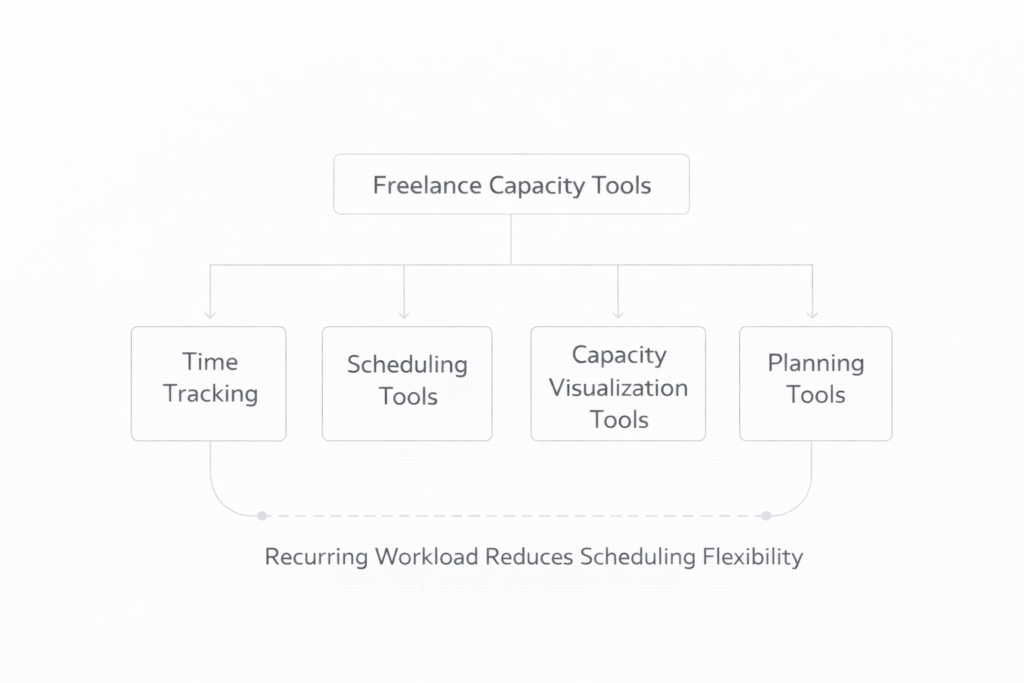
1. Time Tracking Tools (Core Visibility Layer)
Toggl Track
Best for:
Freelancers who need clear visibility into how time is spent across clients and projects.
What it solves:
Without time tracking, workload and utilization remain estimates. Toggl Track makes time measurable.
Key strengths:
- simple time tracking
- clear reporting on billable vs non-billable work
- low friction setup
Limitations:
- does not plan capacity
- requires consistent usage
When to use:
If you want to understand how your time is actually distributed.
Typical use case:
A freelancer working with multiple clients experiences increasing workload pressure.
By tracking time across projects, they discover that one client consumes disproportionate effort.
This insight allows them to:
- rebalance workload
- adjust pricing
- improve utilization
→ Explore Toggl Track
→ Learn more about Toggl Track
Harvest
Combines time tracking with invoicing, connecting delivery effort directly to revenue.
→ Learn more about Harvest
Clockify
Provides a free time tracking system for freelancers starting to measure workload and project effort.
→ Learn more about Clockify
2. Project Scheduling Tools
Scheduling tools help freelancers visualize how projects are distributed across time.
Common features include:
- project timelines
- workload calendars
- task prioritization
Popular tools include:
- Notion
- ClickUp
- Asana
These platforms help identify project overlap and scheduling conflicts.
3. Capacity Visualization Tools
These tools provide visibility into workload allocation and capacity usage.
Typical features include:
- workload dashboards
- capacity allocation views
- project distribution across time
Examples include:
- Float
- Resource Guru
- ClickUp workload views
They help identify when schedules are approaching overload.
4. Planning and Forecasting Tools
Planning tools help evaluate how current commitments affect future workload.
They support:
- scheduling upcoming projects
- forecasting capacity availability
- visualizing delivery timelines
Examples include:
- Notion planning dashboards
- ClickUp timeline views
- Airtable project planning
→ Capacity Forecasting from Pipeline Data
Instead of using multiple tools in isolation, it is more effective to build a simple, structured tool stack that supports your capacity planning workflow.
To explore how these tools fit together:
→ Explore Time & Capacity Tools for Freelancers
How to Choose the Right Tool
Choosing the right tool depends on your current stage.
Early-stage freelancers
→ Start with simple time tracking
Growing consultants
→ Combine time tracking with scheduling tools
Advanced operators
→ Use capacity visualization and forecasting tools
The goal is not to track more.
It is to understand how workload behaves.
Operational Impact
When tools support structured capacity planning, several operational benefits emerge.
Workload Visibility
Freelancers gain insight into how time is distributed across clients and projects.
Better Scheduling Decisions
Delivery commitments remain aligned with available capacity.
Reduced Overload Risk
Workload pressure becomes visible before it creates problems.
Improved Operational Clarity
Fewer tools, used correctly, provide sufficient control.
System-Level Impact Across Processome
Capacity tools influence how workload visibility connects across the Processome architecture.
- Client Pipeline System → intake aligned with capacity visibility
- Capacity Planning System → workload allocation informed by real data
- Profit Tracking System → time tracking supports profitability analysis
- Delivery & Operations System → structured execution timelines
Tools improve coordination between planning and execution.
Final Perspective
Freelancers often search for the perfect productivity tool to organize their workload.
In reality, effective capacity management begins with structured planning.
Within the Processome operating model, the Capacity Planning System defines how consulting capacity should be structured and protected.
Tools support this system by making workload visible.
A freelancer with strong capacity planning frameworks can operate successfully with simple tools.
A freelancer without those frameworks will struggle regardless of software.
Tools support visibility.
Planning creates control.